
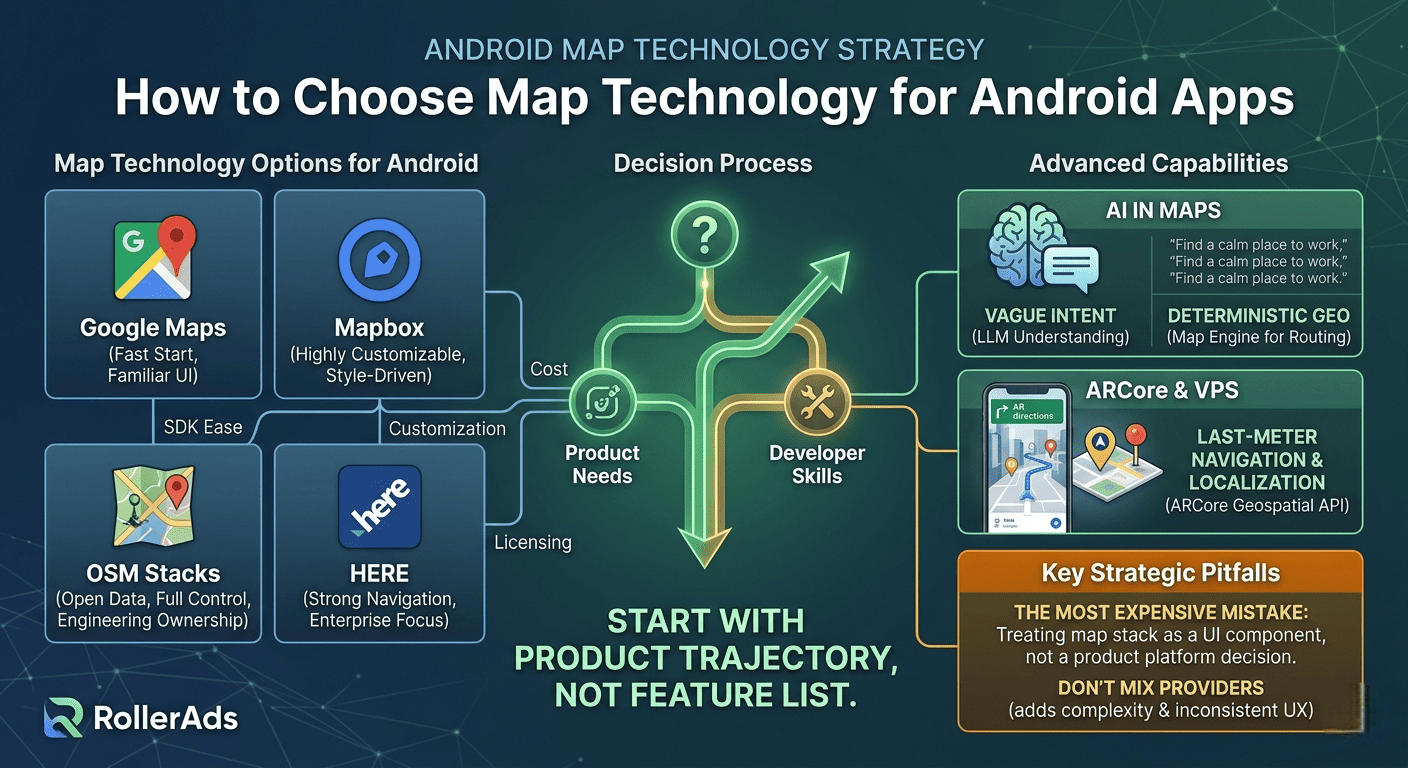
How to choose map technology for Android apps – and where ARCore and AI actually help
The right map technology for your Android app depends mostly on two things: what your team already knows, and your budget.
That sounds less exciting than comparing feature lists, but it’s the truth. Teams rarely fail because they picked the “wrong headline feature.” They fail because they underestimated long‑term costs or chose something their team couldn’t work with comfortably.
The three things that matter most in daily work are: pricing, how much you can customize the look and feel, and how easy the SDK is for developers. Licensing and policy fit are important too, but they usually filter out options early. The real pain starts later: how expensive does this get as usage grows? How far can we push the design? How painful is this stack to live with?
Google Maps – easy start, real limits
Google Maps is the most familiar option for Android developers. The setup is easy, documentation is mature, and everyone knows how to use it. It supports standard maps, markers, camera controls, and styling.
But if the map becomes a core part of your product’s identity – not just a feature – Google Maps can feel limiting. Customization is possible but harder than with other options. There are also strict rules about caching and storing map data.
Bottom line: Google Maps is a strong default when you want low friction and fast delivery. But if your product is deeply map‑shaped, familiarity can start to fight against control.
Mapbox – highly customizable, but more complex
Mapbox gives you much more control over how maps look and behave. It uses a style‑driven model with sources, layers, and custom style definitions. Offline maps are a first‑class feature – a clear advantage over Google Maps.
Pricing is different too: Mapbox bills by monthly active users, not by usage. Navigation has its own pricing layer.
Mapbox is great when the map is not just functional but product‑defining. The tradeoff is a steep learning curve. You get flexibility, but you also inherit more concepts and more places where the architecture can get messy.
OpenStreetMap‑based stacks – open and powerful, but not free
OSM solutions are not just “cheap” – they give you openness and full control. The data is open, and you can build with engines like MapLibre or osmDroid. Customization is unlimited.
But the cost doesn’t disappear – it moves. The public OSM tile servers are not a free high‑scale backend for production apps. You often need to run your own servers or use a commercial OSM service. So OSM reduces licensing cost but increases engineering and operational ownership.
Good when budget is tight or openness matters strategically – but not a lightweight choice.
HERE – overlooked, but strong for navigation
HERE Maps is less familiar to many Android developers, but it deserves attention. It offers two license tiers: Explore (lighter) and Navigate (full turn‑by‑turn). It’s built as a complete location platform, not just a map display.
Best for route‑heavy, operational, or enterprise‑like apps where navigation depth matters more than developer familiarity.
Don’t mix providers
Mixing multiple map providers sounds smart but almost never works as a permanent solution. It multiplies costs, adds development overhead, and creates inconsistency. Different providers have different pricing, offline models, routing behavior, and rules.
The only good reason to mix is during migration from one provider to another. Otherwise, stick with one stack for the life of the project.
Turn‑by‑turn navigation is not just another feature
Adding real navigation changes everything. Your app stops being judged as “an app with a map” and starts being judged as a navigation product. User expectations, testing, background behavior, pricing – all change.
Google bills navigation separately. Mapbox treats it as a distinct subsystem. HERE separates it with the Navigate license. Never treat “we’ll add navigation later” as a minor roadmap item. It can reshape both architecture and business model.
What AI brings to map products
AI in maps means two very different things: computer vision (like ARCore) and large language models (LLMs). Don’t mix them.
ARCore VPS uses image‑based localization – it’s great for high‑accuracy positioning in places where GPS fails, like indoors or dense cities.
LLMs are useful for understanding vague human requests. A user says “find a calm place to work for an hour” – the LLM turns that into structured search actions. But LLMs should not handle route geometry or coordinates. That’s for deterministic geo systems.
Let the LLM interpret the messy human request. Let the map engine own the routing and spatial truth.
Where ARCore actually helps
ARCore becomes genuinely useful for last‑meter navigation and some forms of gaming. The Geospatial API bridges map coordinates with real‑world placement. You can show AR directions for the final few meters to a door or a parked car.
But ARCore depends on VPS availability – which varies by location and Street View coverage. Always have a non‑AR backup path. AR should enhance a map flow, not replace it.
The most expensive mistake
Treating the map stack as a replaceable UI component instead of a product platform decision.
That mistake is cheap at MVP stage and expensive later. Teams start with a familiar SDK, then the product grows. Suddenly you need deeper styling, offline, navigation. The original decision now affects pricing, architecture, and feature velocity. It’s not “choosing the wrong SDK” – it’s realizing too late that the map was central all along.
Conclusion
Start with the product trajectory, not the feature list. Ask: where will the map be in six months? Which stack can grow with that without becoming debt?
- If the map is not the product itself → Google Maps is the easiest default.
- If the map is central and customization matters → Mapbox.
- If budget is tight or openness is strategic → OSM – but accept the engineering ownership.
- If your app is route‑heavy or navigation‑oriented → give HERE a serious look.
On AR/AI: keep the split clear. ARCore for precision localization. LLMs for intent understanding. Neither replaces the core map stack – they make it more usable and precise.
Three short meaningful comments (in English)
- Comment 1 – The most valuable insight here is that mixing map providers almost never works long‑term. Two SDKs mean double the complexity, double the testing, and inconsistent user experience – only worth it during migration.
- Comment 2 – Treating navigation as “just another feature” is a trap. Once you add turn‑by‑turn, your product is judged against dedicated navigation apps. That changes everything from pricing to user expectations.
- Comment 3 – The distinction between LLMs and computer vision in maps is crucial. Let the LLM understand “find a quiet coffee shop with wifi” – but let the map engine handle the actual routing and coordinates. Don’t blur the layers.
Catsusiro
May 30, 2026The most valuable insight here is that mixing map providers almost never works long‑term. Two SDKs mean double the complexity, double the testing, and inconsistent user experience – only worth it during migration.
linkolns
June 1, 2026The distinction between LLMs and computer vision in maps is crucial. Let the LLM understand “find a quiet coffee shop with wifi” – but let the map engine handle the actual routing and coordinates. Don’t blur the layers.